


Weather Monitoring Station Using STM32
Updated: Sep 4
Introduction
A weather monitoring system is used to measure important environmental parameters such as temperature, humidity, and atmospheric pressure. Monitoring these parameters is useful in applications such as weather stations, agriculture, smart homes, and environmental monitoring.
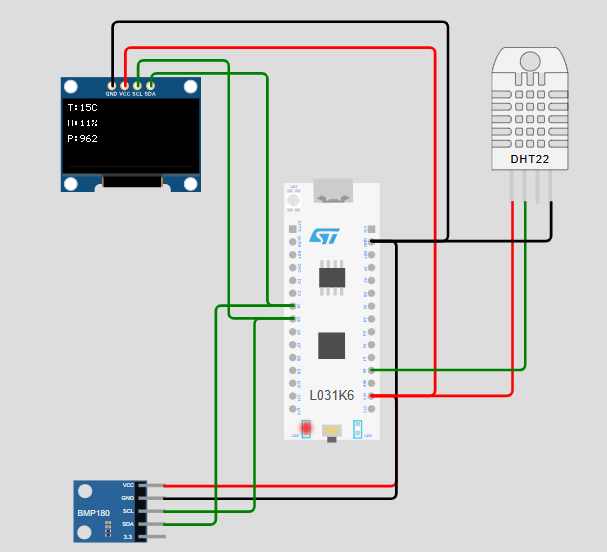
In this project, an STM32 NUCLEO-L031K6 microcontroller is used to develop a weather monitoring station. A DHT22 sensor is used to measure temperature and humidity, while a BMP180 sensor is used to measure atmospheric pressure. The measured values are displayed on an SSD1306 OLED display and can also be observed through the Serial Monitor.
The complete project is implemented and tested using the Wokwi simulation platform, allowing the sensor values and system operation to be verified without physical hardware.
What You'll Learn
By completing this project, you will learn:
How to interface a DHT22 temperature and humidity sensor with an STM32 microcontroller.
How to interface a BMP180 barometric pressure sensor using I²C communication.
How to connect and control an SSD1306 OLED display.
How multiple I²C devices can communicate with the same STM32 I²C bus.
How to read sensor data and display it in real time.
How to monitor sensor readings through the Serial Monitor.
How to simulate and test an STM32-based embedded system using Wokwi.
Components Required
Component | Quantity | Purpose |
STM32 NUCLEO-L031K6 | 1 | Main microcontroller |
DHT22 Sensor | 1 | Temperature and humidity measurement |
BMP180 Sensor | 1 | Atmospheric pressure measurement |
SSD1306 OLED Display | 1 | Displaying sensor readings |
Connecting Wires | As required | Component connections |
Wokwi | 1 | Simulation and testing |
Project Overview
The Weather Monitoring Station consists of an STM32 NUCLEO-L031K6, a DHT22 sensor, a BMP180 pressure sensor, and an SSD1306 OLED display.
The DHT22 measures the temperature and relative humidity, while the BMP180 measures the atmospheric pressure. The STM32 receives the sensor data, processes it, and displays the results on the OLED.
The BMP180 and SSD1306 communicate with the STM32 using the I²C protocol, allowing both devices to share the same SDA and SCL lines.
The complete project was implemented and tested in Wokwi.
Circuit Diagram

The circuit is designed around the STM32 NUCLEO-L031K6 as the main controller. The DHT22 is connected to a digital GPIO pin for temperature and humidity measurement, while the BMP180 and SSD1306 OLED communicate with the STM32 through the I²C interface.
The final Wokwi circuit contains four main elements:
STM32 NUCLEO-L031K6
DHT22
BMP180
SSD1306 OLED display
Circuit Connections
DHT22 Sensor
DHT22 Pin | STM32 Pin |
VCC | 3.3V |
DATA | A0 |
GND | GND |
The DHT22 sends temperature and humidity data through its DATA pin connected to A0.
BMP180 Sensor
BMP180 Pin | STM32 Pin |
VCC | 3.3V |
SDA | D4 |
SCL | D5 |
GND | GND |
SSD1306 OLED
OLED Pin | STM32 Pin |
VCC | 3.3V |
SDA | D4 |
SCL | D5 |
GND | GND |
The BMP180 and SSD1306 share D4 and D5 because both use I²C communication. They are distinguished by their different I²C addresses:
OLED → 0x3C
BMP180 → 0x77
Working Principle
The working of the Weather Monitoring Station can be divided into the following steps:
Step 1: Sensor Initialization
When the system starts, the STM32 initializes the DHT22 sensor, BMP180 sensor, and SSD1306 OLED display.
Step 2: Temperature and Humidity Measurement
The DHT22 measures the surrounding temperature and relative humidity and sends the readings to the STM32.
Step 3: Pressure Measurement
The STM32 communicates with the BMP180 through the I²C interface and obtains the atmospheric pressure reading.
Step 4: Data Processing
The STM32 processes the sensor readings and prepares them for display.
Step 5: Display
The temperature, humidity, and pressure values are displayed on the SSD1306 OLED.
Step 6: Serial Monitoring
The same readings are also printed on the Serial Monitor, which helps verify the sensor data during simulation and debugging.
The process continuously repeats, allowing the system to provide updated environmental readings.
Source Code
The following program is used to interface the DHT22, BMP180, and SSD1306 OLED with the STM32 NUCLEO-L031K6. The program reads the sensor values, processes them, and continuously updates both the OLED display and Serial Monitor.
The DHT sensor library is used for obtaining temperature and humidity readings from the DHT22. The BMP180 and SSD1306 are interfaced through I²C communication.
Code Explanation
The program is divided into different sections to initialize the sensors, communicate with the OLED and BMP180, read the DHT22 values, and display the results.
1. Pin and Sensor Definitions

The required STM32 pins and I²C addresses are defined at the beginning of the program.
A0 is used for the DHT22 data signal.
D4 is used as the I²C SDA line.
D5 is used as the I²C SCL line.
The OLED uses address 0x3C.
The BMP180 uses address 0x77.
This makes the hardware connections clear to the program.
2. I²C Communication

The BMP180 and SSD1306 OLED communicate with the STM32 using the I²C protocol.
The program provides routines for:
Starting I²C communication
Sending data
Receiving data
Sending the stop condition
Since the OLED and BMP180 have different addresses, both devices can use the same SDA and SCL lines.
3. OLED Initialization

The OLED initialization routine configures the SSD1306 display and prepares it to receive data.
The program also provides functions to:
Set the display position
Display individual characters
Display text
Clear individual display lines
This allows the sensor readings to be presented in a simple format.
4. DHT22 Sensor Reading

The DHT22 library is used to obtain the temperature and humidity values.
The program reads:
Temperature → °C
Humidity → %
The program also checks whether the returned values are valid. If an initial reading fails, another reading is attempted after a short delay.
5. BMP180 Pressure Reading


The BMP180 is accessed through I²C.
The program reads the sensor's calibration data and raw pressure information. These values are processed using the BMP180 calibration calculations to obtain the atmospheric pressure in hPa.
6. Setup Function

The setup() function runs once when the STM32 starts.
It:
Starts the Serial Monitor.
Configures the I²C pins.
Initializes the DHT22.
Initializes the OLED.
Initializes the BMP180.
Displays the initial project information.
7. Loop Function
The loop() function continuously performs the measurements.
This allows the weather monitoring station to continuously update the environmental measurements.
Simulation Results
The STM32 Weather Monitoring Station was successfully simulated using the Wokwi online simulator. After compiling and running the program, the DHT22 sensor provided temperature and humidity readings, while the BMP180 sensor measured atmospheric pressure. The measured values were processed by the STM32 and displayed on the connected SSD1306 OLED display.
The OLED continuously displays the environmental parameters in the following format:
T: Temperature in °C
H: Humidity in %
P: Atmospheric Pressure in hPa

The successful simulation verifies that the sensors were correctly interfaced with the STM32 NUCLEO-L031K6, the I²C communication between the BMP180 and OLED was established successfully, and the measured environmental parameters were displayed as intended.
Simulation Video
The following video demonstrates the working of the Weather Monitoring Station in the Wokwi simulator, including the sensor readings and their display on the OLED.
Applications
The Weather Monitoring Station can be used in applications where continuous monitoring of environmental conditions is required. The system can be adapted for:
Weather monitoring: Measuring temperature, humidity, and atmospheric pressure.
Agriculture: Monitoring environmental conditions that can affect crop growth.
Smart homes: Monitoring indoor environmental conditions.
Environmental monitoring: Collecting basic atmospheric data for analysis.
IoT systems: The measured data can be further transmitted to a remote server or cloud platform.
Advantages
Provides real-time environmental measurements.
Uses multiple sensors with a single STM32 microcontroller.
The BMP180 and OLED can share the same I²C communication bus.
Sensor values can be viewed on both the OLED display and Serial Monitor.
The system can be easily extended with additional sensors or communication modules.
The complete design can be tested in Wokwi before physical implementation.
Limitations
The DHT22 has a relatively slow measurement rate, making it unsuitable for applications requiring very fast temperature or humidity updates.
The current project provides local display and monitoring; it does not transmit the readings remotely.
The Wokwi simulation does not represent every aspect of a physical sensor and hardware implementation.
Future Scope
The project can be further improved by adding wireless communication and cloud connectivity. The sensor readings could be transmitted to an IoT platform and monitored remotely through a web or mobile application.
Additional features such as data logging, graphical visualization, threshold-based alerts, and additional environmental sensors can also be integrated to develop a more advanced weather monitoring system.
Conclusion
The Weather Monitoring Station using STM32 was successfully implemented and tested using the Wokwi online simulator. The system measures temperature, humidity, and atmospheric pressure using the DHT22 and BMP180 sensors and displays the readings on an SSD1306 OLED.
The project demonstrates sensor interfacing, I²C communication, data processing, and real-time display using the STM32 NUCLEO-L031K6.
The successful simulation confirms that the complete system operates as intended and provides a foundation for developing more advanced environmental and IoT monitoring systems.
The Dinosaur Game is one of those games that proves you do not need complicated graphics or a massive download to have fun. The little T-Rex, the simple obstacles, and that ever-increasing speed are enough to turn a quick attempt into a serious high-score challenge.