


Smart Home Automation Using STM32 Nucleo
Updated: Sep 4
Introduction
Smart Home Automation is a system that uses sensors, a microcontroller, and actuators to monitor and control different devices automatically. The main objective of this project is to develop a simple smart home system using the STM32 Nucleo-L031K6 that can respond to temperature, light, and motion conditions while also allowing manual control.
The system uses a DHT22 sensor to monitor temperature, an LDR to detect the surrounding light level, and a PIR sensor to detect motion. Based on these sensor readings, the STM32 controls a fan, lamp, and security alarm through relay modules. A push button is also provided for manual control of the lamp. An OLED display continuously shows the current temperature, light condition, motion status, and the state of the fan, lamp, and alarm.
The complete system is developed and tested using the Wokwi simulation environment before implementation on physical hardware
Components Required
Component | Purpose |
STM32 Nucleo-L031K6 | Main microcontroller that processes sensor inputs and controls the outputs |
DHT22 Temperature Sensor | Measures the surrounding temperature and controls the fan automatically |
LDR (Photoresistor) | Detects the surrounding light level for automatic lamp control |
PIR Motion Sensor | Detects movement in the monitored area |
OLED Display (SSD1306) | Displays temperature, light, motion, fan, lamp, and alarm status |
Relay Module 1 | Controls the lamp |
Relay Module 2 | Controls the fan |
Push Button | Provides manual ON/OFF control of the lamp |
Buzzer | Produces an audible alarm when motion is detected in darkness |
System Overview and Working Principle
The Smart Home Automation System is built around the STM32 Nucleo-L031K6, which acts as the central controller. It continuously receives information from the DHT22 temperature sensor, LDR, and PIR motion sensor and uses these inputs to control the connected appliances.

The system works through the following sequence:
Temperature Monitoring: The DHT22 measures the surrounding temperature. When the temperature reaches or exceeds 30°C, the STM32 switches the fan ON through the fan relay. When the temperature falls below the threshold, the fan is switched OFF.
Automatic Lighting: The LDR detects the surrounding light level. When the environment is dark, the lamp is automatically switched ON through the lamp relay. In bright conditions, the automatic lamp is switched OFF.
Manual Lamp Control: A push button allows the user to manually toggle the lamp. This provides manual control even when the automatic lighting condition does not require the lamp to be ON.
Motion Detection and Security: The PIR sensor detects movement. When motion is detected in a dark environment, the security alarm is activated and the buzzer produces an audible warning.
Status Monitoring: The OLED display provides real-time information about the temperature, light condition, motion, fan, lamp, and alarm status.
All these functions are integrated into a single system, allowing the microcontroller to monitor the environment and respond automatically while also providing manual control when required.
Circuit Connections
The STM32 Nucleo-L031K6 is connected to the sensors, display, relays, buzzer, and push button through dedicated GPIO and analog pins. The final connections used in the project are shown below.
Component | STM32 Pin | Function |
DHT22 | A0 | Temperature data |
LDR | A1 | Light-level measurement |
PIR Motion Sensor | D2 | Motion detection |
Lamp Relay | D3 | Lamp control |
OLED SDA | D4 | I²C data |
OLED SCL | D5 | I²C clock |
Buzzer | D6 | Security alarm |
Push Button | D1 | Manual lamp control |
Fan Relay | D9 | Fan control |
The sensors and modules are powered using the 3.3 V supply and GND connections of the STM32 board. The OLED uses the I²C interface, while the two relay modules provide independent control of the lamp and fan.
Programming and Implementation
The system is programmed to continuously monitor the sensor inputs and make decisions according to predefined conditions. The program is divided into separate sections for sensor reading, automatic control, manual control, alarm operation, and OLED display.
5.1 Pin Configuration

The required pins are defined at the beginning of the program so that each sensor and actuator can be easily identified and controlled.
5.2 Temperature Monitoring and Automatic Fan Control
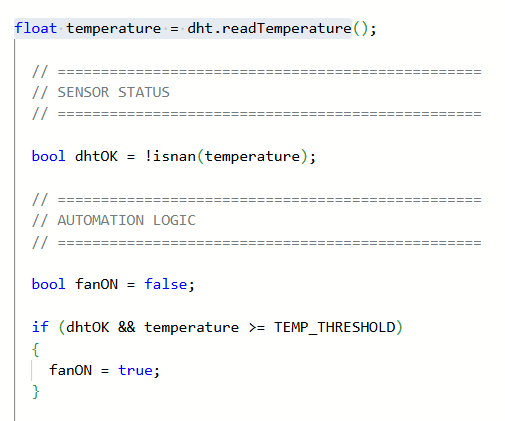

The DHT22 temperature sensor is used to continuously monitor the surrounding temperature. The STM32 reads the temperature value and compares it with a predefined threshold of 30°C.
When the temperature is 30°C or higher, the fan relay is activated and the fan turns ON. When the temperature falls below 30°C, the relay is deactivated and the fan turns OFF.
This allows the fan to operate automatically according to the surrounding temperature without requiring manual intervention.
5.3 Automatic Lighting Control Using LDR


The LDR is used to determine whether the surrounding environment is bright or dark. The STM32 reads the analog value from the LDR and compares it with a predefined threshold.
When the measured light level indicates darkness, the lamp is automatically switched ON through the lamp relay. When sufficient light is detected, the automatic lamp is switched OFF. The manual push button can additionally override the automatic state and turn the lamp ON or OFF.
5.4 Manual Lamp Control Using Push Button

A push button is provided to give the user manual control over the lamp. Each press of the button toggles the manualLight state between ON and OFF.
This manual control works alongside the automatic LDR-based lighting system. Therefore, the user can manually switch the lamp ON even when the environment is bright.
5.5 Motion Detection and Security Alarm


The PIR motion sensor is used to detect movement in the monitored area. For security, the system activates the alarm only when motion is detected while the environment is dark.
The buzzer is controlled according to the resulting alarm condition. When motion is detected in darkness, the OLED reports the alarm status and the buzzer is activated.
5.6 OLED Display


The OLED display is used to provide real-time information about the smart home system. The program updates the display with the current temperature, light condition, motion status, fan status, lamp status, and alarm status.
Source Code
The complete source code used to program the STM32 Nucleo-L031K6 and implement the smart home automation system is provided below for reference and download.
SIMULATION AND OUTPUT
The complete Smart Home Automation system was implemented and tested using the Wokwi simulation environment. The simulation integrates the STM32 Nucleo board with the DHT22 temperature sensor, LDR, PIR motion sensor, push button, relay modules, buzzer, and OLED display. The system was tested under different sensor conditions to verify the automatic and manual control functions.

Future Scope
The project can be further enhanced by:
IoT connectivity for remote monitoring and appliance control.
Mobile application integration for controlling home appliances remotely.
Additional sensors for gas, smoke, humidity, and door/window detection.
Energy-consumption monitoring for improved energy management.
Voice-controlled appliances for improved user convenience.
Implementation using physical hardware for real-world deployment.
Conclusion
The Smart Home Automation system successfully demonstrates how a microcontroller can integrate multiple sensors and actuators to provide automatic monitoring, appliance control, and basic security features. The combination of temperature, light, and motion sensing enables the system to respond automatically to changing environmental conditions, while the push button provides additional manual control.
The Wokwi simulation confirmed the operation of the complete system, including automatic lighting, temperature-based fan control, motion-based security alarm, relay operation, and real-time OLED monitoring.
Comments