


Multi-Game LCD Arcade System Using Arduino Uno
Introduction
Embedded systems are widely used to develop interactive electronic devices by combining hardware and software. One of the best ways to understand embedded programming is through game development, where concepts such as user input, display control, timing, and state management are implemented in a practical manner.

In this project, I developed a Multi-Game LCD Arcade System using an Arduino Uno, a 16×2 I2C LCD, push buttons, and a buzzer. The entire project was designed and tested using Tinkercad Circuits. Despite the limited hardware resources, the system provides an engaging gaming experience through efficient programming techniques and custom LCD graphics.
The arcade consists of three fully playable games—Runner, Memory Match, and Dinosaur Game—accessible through a menu-driven interface. The system also includes a startup animation, sound effects, score tracking, progressive difficulty, and smooth game-state transitions, making it feel like a compact handheld arcade console.
This project demonstrates how creativity and efficient programming can transform simple electronic components into a complete gaming system while strengthening concepts related to Arduino programming, embedded systems, finite state machines, and LCD graphics.
Project Overview
The Multi-Game LCD Arcade System is an interactive gaming platform developed using the Arduino Uno and a 16×2 I2C LCD display. The objective of this project was to create a compact arcade console capable of running multiple games on resource-constrained hardware while providing a smooth and enjoyable user experience.
The system features a menu-driven interface that allows users to navigate between different games using push buttons. A startup screen welcomes the user when the system powers on, followed by the main menu where one of the three games can be selected.
The arcade includes the following games:
Runner Game: A reflex-based game where the player avoids incoming obstacles by switching between the upper and lower rows of the LCD display. The game tests the player's reaction speed and timing.
Memory Match Game: A memory challenge in which players memorize and reproduce randomly generated LED/button sequences. As the levels progress, the sequences become longer and more difficult, improving memory and concentration.
Dinosaur Game: Inspired by the popular Chrome Dino game, this version requires the player to jump over cacti and avoid flying birds. The game features random obstacle generation, score tracking, collision detection, and progressive difficulty that increases as the player survives longer.
In addition to the games, the arcade system includes sound effects through a buzzer, custom LCD characters for game graphics, score tracking, game-over screens, and smooth transitions between different game states. The entire project was designed, programmed, and tested using Tinkercad Circuits, demonstrating how a simple Arduino-based system can deliver multiple interactive applications within the limitations of a 16×2 LCD display.
Hardware Components
Component | Quantity | Purpose |
Arduino Uno | 1 | Main microcontroller that controls the entire arcade system |
16×2 I2C LCD Display | 1 | Displays menus, game graphics, scores, and system messages |
4×4 Matrix Keypad | 1 | Used as the primary input device for the Memory Match game |
Push Buttons | 3 | Used for controlling the Runner and Dinosaur games (Up, Down, Jump) |
Active Buzzer | 1 | Produces sound effects and game feedback |
Breadboard | 1 | Used for assembling the prototype circuit |
Jumper Wires | Multiple | Used to establish electrical connections between components |
Software and Simulation Environment
The complete project was programmed using the Arduino IDE and tested through Tinkercad Circuits. Tinkercad provided a virtual environment for designing the circuit, simulating the hardware, and verifying the program before deployment.
Software Used
Arduino IDE – Writing, compiling, and debugging the Arduino program.
Tinkercad Circuits – Circuit design, simulation, and testing.
Circuit Design
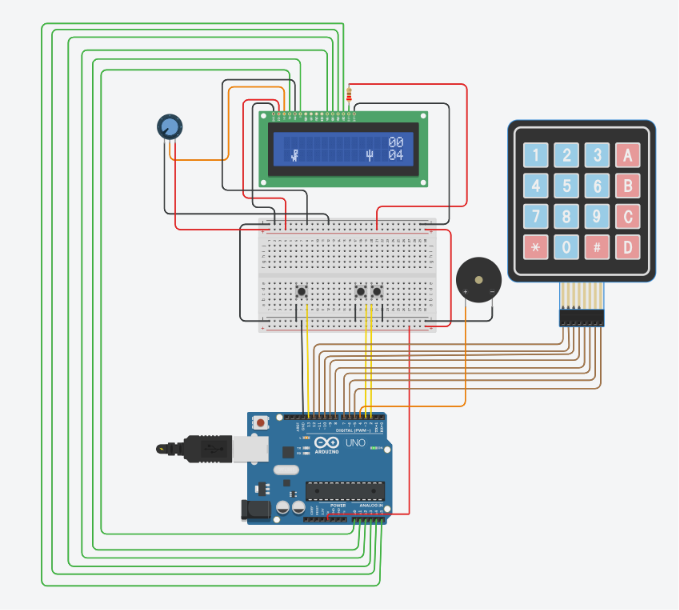
The Arduino Uno acts as the central controller and interfaces with all peripheral devices. A 16×2 I2C LCD is used to display the user interface, menus, gameplay, and scores while minimizing the number of required Arduino pins through I2C communication.
Three push buttons are connected to provide dedicated controls for the Runner and Dinosaur games. A 4×4 matrix keypad is integrated to receive user input during the Memory Match game, allowing efficient sequence entry using multiple keys. An active buzzer provides audio feedback during gameplay, menu navigation, and game events, enhancing the overall user experience.
The combination of multiple input devices allows each game to utilize the most suitable control mechanism while sharing a common hardware platform.

System Features
The Multi-Game LCD Arcade System was designed to provide an engaging user experience while demonstrating multiple embedded system concepts on a resource-constrained platform. The following features were implemented in the project:
1. Interactive Boot Screen
A startup screen is displayed when the system is powered on, giving the arcade a professional appearance before entering the main menu.
2. Menu-Driven Navigation
A simple and intuitive menu allows users to switch between different games using dedicated navigation buttons. This makes the system easy to operate without restarting the Arduino.
3. Three Fully Playable Games
Runner Game
A fast-paced reflex game in which the player switches between the upper and lower LCD rows to avoid incoming obstacles. The game emphasizes reaction time and hand-eye coordination.

Memory Match Game
A memory-based game where the system generates a random sequence that the player must reproduce using the 4×4 keypad. The difficulty increases as longer sequences are generated.

Dinosaur Game
Inspired by Google's Chrome Dinosaur Game, this version challenges players to jump over cacti and avoid flying birds. The game includes random obstacle generation, collision detection, score tracking, and progressively increasing difficulty to enhance gameplay.

4. Custom LCD Graphics
The project utilizes custom CGRAM characters to create game sprites such as the dinosaur, cactus, bird, and other graphical elements, making the games visually appealing despite the limitations of a 16×2 LCD.
5. Audio Feedback
An active buzzer provides sound effects during gameplay and menu interactions, improving user engagement and providing immediate feedback for different game events.
6. Score Tracking
Each game maintains and displays the player's score, allowing users to monitor their performance during gameplay.
7. Progressive Difficulty
The Dinosaur Game gradually increases its speed as the player's score increases, creating a more challenging experience over time.
8. Efficient State Management
The entire arcade operates using a menu-based state machine, enabling smooth transitions between the startup screen, main menu, games, game-over screens, and score displays.

Working Principle
The Multi-Game LCD Arcade System operates through a menu-driven architecture implemented on the Arduino Uno. When the system is powered on, the Arduino initializes all hardware components, including the I2C LCD display, push buttons, matrix keypad, and buzzer. A startup screen is displayed before the system enters the main menu.

From the main menu, the user can navigate between the available games using the dedicated navigation buttons. Once a game is selected, the Arduino transfers control to the corresponding game logic while continuously monitoring user inputs and updating the LCD display in real time.
Each game follows its own gameplay logic:
Runner Game: The player uses the Up and Down buttons to switch between the two LCD rows and avoid approaching obstacles. The Arduino continuously updates obstacle positions, checks for collisions, and maintains the player's score until a collision occurs.
Memory Match Game: The Arduino generates a random sequence and displays it to the player. The player reproduces the sequence using the 4×4 matrix keypad. The program compares the entered sequence with the generated sequence to determine whether the player advances to the next level or the game ends.
Dinosaur Game: The player controls the dinosaur using the Jump button to avoid randomly generated cacti and flying birds. The Arduino performs collision detection, updates obstacle positions, increases the score after successfully avoiding obstacles, and gradually increases the game speed to enhance difficulty.
Throughout the project, the Arduino manages LCD updates, user inputs, sound effects, score tracking, and transitions between different game states. This menu-driven state machine enables all three games to operate independently while sharing the same hardware platform.
Code Explanation
The software for the Multi-Game LCD Arcade System was developed in the Arduino IDE using C++. The program follows a modular and menu-driven architecture, allowing multiple games to run independently while sharing the same hardware resources. Each game is implemented as a separate module, making the code easier to understand, maintain, and expand.
Libraries Used
The project utilizes the following Arduino libraries:
Wire.h – Enables I2C communication between the Arduino Uno and the LCD display.
LiquidCrystal_I2C.h – Controls the 16×2 I2C LCD for displaying menus, game graphics, scores, and messages.
Keypad.h – Interfaces with the 4×4 matrix keypad used in the Memory Match game.
These libraries simplify hardware communication and allow the program to focus on game logic rather than low-level device control.
Program Structure
The software is organized into several functional modules, each responsible for a specific part of the arcade system.

1. System Initialization
During startup, the Arduino initializes the LCD display, configures all input and output pins, loads custom LCD characters, and prepares the system for user interaction. A boot screen is displayed before entering the main menu.
2. Menu Management
The main menu acts as the central navigation hub of the arcade system. Users can move through the available games using the navigation buttons and start the selected game without restarting the Arduino.
3. Game Modules
Each game operates independently with its own gameplay logic while sharing the same display and hardware resources.
Runner Game implements obstacle movement, player movement, collision detection, and score tracking.
Memory Match Game generates random sequences, accepts keypad input, verifies the player's response, and increases difficulty as the player progresses.
Dinosaur Game manages jumping mechanics, random obstacle generation, collision detection, score calculation, and dynamic speed adjustment.
4. Display Management
The 16×2 LCD continuously updates menus, animations, game objects, scores, and status messages. Custom LCD characters stored in CGRAM are used to create sprites such as the dinosaur, bird, and cactus, providing a graphical experience despite the LCD's limitations.
5. Input Handling
Different input devices are used depending on the active game. Push buttons provide responsive controls for the Runner and Dinosaur games, while the 4×4 matrix keypad enables sequence entry in the Memory Match game.
6. Audio Feedback
The buzzer generates sound effects during gameplay, menu navigation, and game-over events, providing immediate feedback and improving the overall user experience.
The complete Arduino source code for corresponding project is provided as a downloadable file below.
Project Demonstration
A demonstration video of the Multi-Game LCD Arcade System has been provided to showcase the complete functionality of the project. The video includes the startup sequence, menu navigation, gameplay of all three games, sound feedback, scoring system, and overall user interaction within the Tinkercad simulation environment.
Project Demonstration Video:
Conclusion
The Multi-Game LCD Arcade System demonstrates how a simple Arduino Uno can be transformed into an interactive gaming platform through efficient programming and creative use of limited hardware resources. By combining a menu-driven interface, custom LCD graphics, responsive controls, audio feedback, and multiple games, the project delivers an engaging user experience while showcasing important embedded systems concepts.
Throughout the development process, the project strengthened practical knowledge of Arduino programming, finite state machines, hardware interfacing, LCD graphics, keypad communication, collision detection, and software organization. It also highlighted the importance of testing, debugging, and iterative development in producing a stable and reliable embedded application.
Overall, the project successfully achieved its objective of creating a compact multi-game arcade system and serves as a valuable learning experience in embedded systems and interactive application development.
Comments