


DIGITAL THERMOSTAT
This project is designed to monitor the surrounding temperature and automatically control a relay based on a user-defined temperature setting. The temperature sensor continuously reads the current temperature and sends the data to the microcontroller for processing. The system then compares the measured temperature with the user-set value and switches the relay ON or OFF accordingly. This allows a connected device, such as a fan, motor, heater, or cooling system, to operate automatically and help maintain the desired temperature range. The current temperature and system status can also be displayed on an OLED screen for easy monitoring.
Components Required
STM32F103 development board
DHT22 temperature sensor
Relay
SSD1306 OLED
Servo Motor
Connecting Wires
Circuit Connections
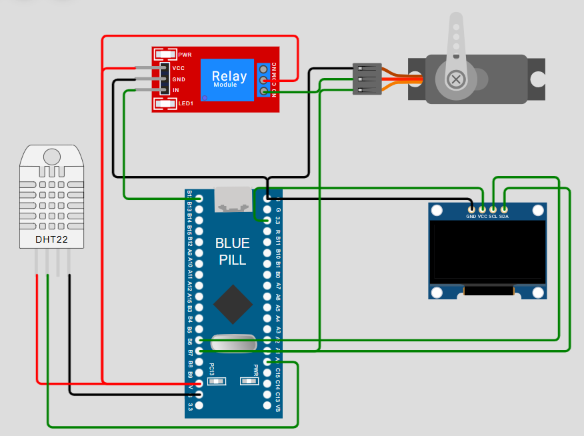
STM32 Program
#include "SSD1306.h"
#include "DHT22.h"
#include <Servo.h>

#define DHT_PIN PA0
#define SERVO_PIN PA1

const int relayPin = PB12;

float userset_temp = 40.0;

// Hysteresis
float motor_off_temp = 38.0;

SSD1306 oled;
DHT22 dht(DHT_PIN);
Servo motor;

bool motorRunning = false;

void setup()
{
    Serial.begin(9600);

    Serial.println("STM32 Blue Pill Starting...");

    // -----------------------------
    // Relay
    // -----------------------------

    pinMode(relayPin, OUTPUT);

    // Relay OFF initially
    digitalWrite(relayPin, LOW);

    // -----------------------------
    // Servo
    // -----------------------------

    motor.attach(SERVO_PIN);

    // Servo at OFF position
    motor.write(0);

    // -----------------------------
    // OLED
    // -----------------------------

    oled.begin();

    Serial.println("OLED started");

    oled.clear();

    // oled.print("STM32 BLUE PILL");
    // oled.print("\n");
    // oled.print("Starting...");

    oled.display();

    // -----------------------------
    // DHT22
    // -----------------------------

    dht.begin();

    Serial.println("DHT22 started");

    delay(2000);
}

void loop()
{
    float temperature = 0.0;
    float humidity = 0.0;

    // -----------------------------
    // Read DHT22
    // -----------------------------

    if (dht.read(temperature, humidity))
    {
        Serial.print("Temperature: ");
        Serial.print(temperature, 1);
        Serial.print(" C   ");

        Serial.print("Humidity: ");
        Serial.print(humidity, 1);
        Serial.println(" %");

        // -----------------------------
        // OLED
        // -----------------------------

        oled.clear();

        oled.print("TEMP: ");
        oled.print(temperature, 1);
        oled.print(" C");

        oled.print("\n");

        oled.print("HUM: ");
        oled.print(humidity, 1);
        oled.print(" %");

        oled.print("\n");

        if (motorRunning)
        {
            oled.print("MOTOR: ON");
        }
        else
        {
            oled.print("MOTOR: OFF");
        }

        oled.display();

        // -----------------------------
        // Temperature control
        // -----------------------------

        // Turn ON at 40 C
        if (!motorRunning && temperature >= userset_temp)
        {
            motorRunning = true;

            digitalWrite(relayPin, HIGH);

            motor.write(90);

            Serial.println("RELAY ON");
            Serial.println("MOTOR ON");
        }

        // Turn OFF below 38 C
        else if (motorRunning && temperature <= motor_off_temp)
        {
            motorRunning = false;

            digitalWrite(relayPin, LOW);

            motor.write(0);

            Serial.println("RELAY OFF");
            Serial.println("MOTOR OFF");
        }
    }

    // -----------------------------
    // DHT22 ERROR
    // -----------------------------

    else
    {
        Serial.println("DHT22 ERROR");

        oled.clear();

        oled.print("DHT22 ERROR");

        oled.display();

        // Do NOT immediately switch the motor
        // because of one failed DHT22 reading.
    }

    // DHT22 should not be read too quickly
    delay(2000);
}
Code Explanation
These libraries are used to control the OLED display, read data from the DHT22 temperature and humidity sensor, and control the servo motor.
The hardware connections are defined as follows:
PA0 DHT22 data pin
PA1 Servo motor control pin
PB12 Relay control pin
float userset_temp = 40.0;
float motor_off_temp = 38.0;
The system uses two temperature limits:
At 40°C or above, the motor and relay turn ON.
At 38°C or below, the motor and relay turn OFF.
This difference between the ON and OFF temperatures is called hysteresis. It prevents the relay and motor from rapidly switching ON and OFF when the temperature is close to 40°C
SSD1306 oled;
DHT22 dht(DHT_PIN);
Servo motor;
These lines create objects for controlling:
The OLED display
The DHT22 sensor
The servo motor
The setup() function runs only once when the STM32 starts.
Serial.begin(9600);This starts serial communication at 9600 baud for displaying information on the Serial Monitor.
pinMode(relayPin, OUTPUT);
digitalWrite(relayPin, LOW);
The relay pin is configured as an output and initially turned OFF.
motor.attach(SERVO_PIN);
motor.write(0);
The servo is connected to PA1 and initially positioned at 0 degrees, representing the OFF state.
oled.begin();
oled.clear();
oled.display();
OLED initialization
dht.begin();
Serial.println("DHT22 started");
This initializes the DHT22 sensor so it can begin measuring temperature and humidity.
float temperature = 0.0;
float humidity = 0.0;
Variables are created to store the sensor readings.
The program then reads the DHT22:
if (dht.read(temperature, humidity))If the sensor successfully provides data, the program continues.
The following code prints the sensor readings:
Serial.print("Temperature: ");
Serial.print(temperature, 1);

Serial.print("Humidity: ");
Serial.print(humidity, 1);

The OLED is cleared first:

oled.clear();

Then the temperature is displayed:

oled.print("TEMP: ");
oled.print(temperature, 1);
oled.print(" C");

Humidity is displayed on the next line:

oled.print("HUM: ");
oled.print(humidity, 1);
oled.print(" %");
The motor status is also displayed
oled.display();updates the OLED screen with all the information at once.
The most important part of the program is the automatic temperature control.
Turning the Motor ON
if (!motorRunning && temperature >= userset_temp)This means:
The motor is currently OFF.
The temperature has reached 40°C or above.
Then:
motorRunning = true;
digitalWrite(relayPin, HIGH);
motor.write(90);
The relay turns ON and the servo moves to 90 degrees.
Turning the Motor OFF
else if (motorRunning && temperature <= motor_off_temp)This means:
The motor is currently ON.
The temperature has dropped to 38°C or below.
Then:
motorRunning = false;
digitalWrite(relayPin, LOW);
motor.write(0);
The relay turns OFF and the servo returns to 0 degrees.
Without hysteresis, the system could continuously switch when the temperature is close to 40°C:
39.9°C → OFF
40.0°C → ON
39.9°C → OFF
40.0°C → ON
This could cause relay flickering or chattering.
Using hysteresis solves this:
Temperature ≥ 40°C → Motor ON
Motor remains ON
Temperature ≤ 38°C → Motor OFF
This provides more stable operation.
If the sensor cannot provide valid data:
else
{
    Serial.println("DHT22 ERROR");
    oled.clear();
    oled.print("DHT22 ERROR");
    oled.display();
}
The system displays:
DHT22 ERRORon both the Serial Monitor and OLED.
The program does not immediately change the motor state because a single sensor reading failure should not unnecessarily switch the system.
How to simulate in Wokwi
Open Wokwi simulator online.
Select STM32, Select the Bluepill (STM32F103C8T6) board.
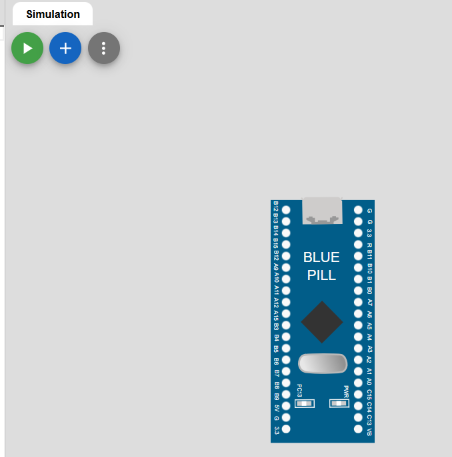
Insert the temperature sensor DHT22 by pressing the + icon.
Connect the GND pin of DHT22 to the GND pin of Bluepill board,
SDA pin of DHT22 to A0 pin of Bluepill,
VCC pin of DHT22 to 5V of Bluepill as shown below.

Insert the relay module and servo motor, Connect the relay module and servo motor to the bluepill board as shown below,

BLUEPILL | RELAY | MOTOR |
5V | VCC | - |
GND | GND | GND |
B12 | IN | - |
5V | COM | - |
- | NO | V+ |
B7 | - | PWM |
Insert OLED and connect to bluepill as shown below, GND pin of OLED to GND of Bluepill, VCC of OLED to 3.3 of Bluepill, SCL & SDA to B6 & B7 respectively.
Click on the new file option to insert sensor libraries SSD1306.h and DHT22.h

Insert the library file SSD1306.h given below,
#ifndef SSD1306_H
#define SSD1306_H

#include <Arduino.h>
#include <Wire.h>

#define SSD1306_ADDRESS 0x3C
#define SSD1306_WIDTH 128
#define SSD1306_HEIGHT 64

class SSD1306
{
private:

    uint8_t buffer[SSD1306_WIDTH * SSD1306_HEIGHT / 8];

    uint8_t cursorX;
    uint8_t cursorY;

    void setPixel(uint8_t x, uint8_t y, bool state)
    {
        if (x >= 128 || y >= 64)
            return;

        uint16_t index = x + (y / 8) * 128;

        if (state)
            buffer[index] |= (1 << (y % 8));
        else
            buffer[index] &= ~(1 << (y % 8));
    }

    void command(uint8_t cmd)
    {
        Wire.beginTransmission(SSD1306_ADDRESS);
        Wire.write(0x00);
        Wire.write(cmd);
        Wire.endTransmission();
    }

    void drawChar(uint8_t x, uint8_t y, char c)
    {
        uint8_t fontData[5];

        if (c >= 'a' && c <= 'z')
            c -= 32;

        getFont(c, fontData);

        for (uint8_t col = 0; col < 5; col++)
        {
            for (uint8_t row = 0; row < 7; row++)
            {
                if (fontData[col] & (1 << row))
                    setPixel(x + col, y + row, true);
            }
        }
    }

    void getFont(char c, uint8_t *f)
    {
        memset(f, 0, 5);

        switch (c)
        {
            case 'A': f[0]=0x7E; f[1]=0x11; f[2]=0x11; f[3]=0x11; f[4]=0x7E; break;
            case 'B': f[0]=0x7F; f[1]=0x49; f[2]=0x49; f[3]=0x49; f[4]=0x36; break;
            case 'C': f[0]=0x3E; f[1]=0x41; f[2]=0x41; f[3]=0x41; f[4]=0x22; break;
            case 'D': f[0]=0x7F; f[1]=0x41; f[2]=0x41; f[3]=0x22; f[4]=0x1C; break;
            case 'E': f[0]=0x7F; f[1]=0x49; f[2]=0x49; f[3]=0x49; f[4]=0x41; break;
            case 'F': f[0]=0x7F; f[1]=0x09; f[2]=0x09; f[3]=0x09; f[4]=0x01; break;
            case 'G': f[0]=0x3E; f[1]=0x41; f[2]=0x49; f[3]=0x49; f[4]=0x7A; break;
            case 'H': f[0]=0x7F; f[1]=0x08; f[2]=0x08; f[3]=0x08; f[4]=0x7F; break;
            case 'I': f[0]=0x00; f[1]=0x41; f[2]=0x7F; f[3]=0x41; f[4]=0x00; break;
            case 'J': f[0]=0x20; f[1]=0x40; f[2]=0x41; f[3]=0x3F; f[4]=0x01; break;
            case 'K': f[0]=0x7F; f[1]=0x08; f[2]=0x14; f[3]=0x22; f[4]=0x41; break;
            case 'L': f[0]=0x7F; f[1]=0x40; f[2]=0x40; f[3]=0x40; f[4]=0x40; break;
            case 'M': f[0]=0x7F; f[1]=0x02; f[2]=0x0C; f[3]=0x02; f[4]=0x7F; break;
            case 'N': f[0]=0x7F; f[1]=0x04; f[2]=0x08; f[3]=0x10; f[4]=0x7F; break;
            case 'O': f[0]=0x3E; f[1]=0x41; f[2]=0x41; f[3]=0x41; f[4]=0x3E; break;
            case 'P': f[0]=0x7F; f[1]=0x09; f[2]=0x09; f[3]=0x09; f[4]=0x06; break;
            case 'Q': f[0]=0x3E; f[1]=0x41; f[2]=0x51; f[3]=0x21; f[4]=0x5E; break;
            case 'R': f[0]=0x7F; f[1]=0x09; f[2]=0x19; f[3]=0x29; f[4]=0x46; break;
            case 'S': f[0]=0x46; f[1]=0x49; f[2]=0x49; f[3]=0x49; f[4]=0x31; break;
            case 'T': f[0]=0x01; f[1]=0x01; f[2]=0x7F; f[3]=0x01; f[4]=0x01; break;
            case 'U': f[0]=0x3F; f[1]=0x40; f[2]=0x40; f[3]=0x40; f[4]=0x3F; break;
            case 'V': f[0]=0x1F; f[1]=0x20; f[2]=0x40; f[3]=0x20; f[4]=0x1F; break;
            case 'W': f[0]=0x7F; f[1]=0x20; f[2]=0x18; f[3]=0x20; f[4]=0x7F; break;
            case 'X': f[0]=0x63; f[1]=0x14; f[2]=0x08; f[3]=0x14; f[4]=0x63; break;
            case 'Y': f[0]=0x07; f[1]=0x08; f[2]=0x70; f[3]=0x08; f[4]=0x07; break;
            case 'Z': f[0]=0x61; f[1]=0x51; f[2]=0x49; f[3]=0x45; f[4]=0x43; break;

            case '0': f[0]=0x3E; f[1]=0x45; f[2]=0x49; f[3]=0x51; f[4]=0x3E; break;
            case '1': f[0]=0x00; f[1]=0x21; f[2]=0x7F; f[3]=0x01; f[4]=0x00; break;
            case '2': f[0]=0x23; f[1]=0x45; f[2]=0x49; f[3]=0x51; f[4]=0x21; break;
            case '3': f[0]=0x42; f[1]=0x41; f[2]=0x51; f[3]=0x69; f[4]=0x46; break;
            case '4': f[0]=0x0C; f[1]=0x14; f[2]=0x24; f[3]=0x7F; f[4]=0x04; break;
            case '5': f[0]=0x72; f[1]=0x51; f[2]=0x51; f[3]=0x51; f[4]=0x4E; break;
            case '6': f[0]=0x1E; f[1]=0x29; f[2]=0x49; f[3]=0x49; f[4]=0x06; break;
            case '7': f[0]=0x40; f[1]=0x47; f[2]=0x48; f[3]=0x50; f[4]=0x60; break;
            case '8': f[0]=0x36; f[1]=0x49; f[2]=0x49; f[3]=0x49; f[4]=0x36; break;
            case '9': f[0]=0x30; f[1]=0x49; f[2]=0x49; f[3]=0x4A; f[4]=0x3C; break;

            case '.':
                f[0]=0x00; f[1]=0x00; f[2]=0x60; f[3]=0x60; f[4]=0x00;
                break;

            case ':':
                f[0]=0x00; f[1]=0x36; f[2]=0x36; f[3]=0x00; f[4]=0x00;
                break;

            case '%':
                f[0]=0x63; f[1]=0x13; f[2]=0x08; f[3]=0x64; f[4]=0x63;
                break;

            case '-':
                f[0]=0x08; f[1]=0x08; f[2]=0x08; f[3]=0x08; f[4]=0x08;
                break;

            case ' ':
                break;
        }
    }

public:

    SSD1306()
    {
        cursorX = 0;
        cursorY = 0;
        memset(buffer, 0, sizeof(buffer));
    }

    void begin()
    {
        Wire.setSDA(PB7);
        Wire.setSCL(PB6);
        Wire.begin();

        delay(100);

        command(0xAE);
        command(0xD5);
        command(0x80);
        command(0xA8);
        command(0x3F);
        command(0xD3);
        command(0x00);
        command(0x40);
        command(0x8D);
        command(0x14);
        command(0x20);
        command(0x00);
        command(0xA1);
        command(0xC8);
        command(0xDA);
        command(0x12);
        command(0x81);
        command(0x7F);
        command(0xD9);
        command(0xF1);
        command(0xDB);
        command(0x40);
        command(0xA4);
        command(0xA6);
        command(0xAF);

        clear();
    }

    void clear()
    {
        memset(buffer, 0, sizeof(buffer));

        cursorX = 0;
        cursorY = 0;
    }

    void setCursor(uint8_t x, uint8_t y)
    {
        cursorX = x;
        cursorY = y;
    }

    void print(char c)
    {
        if (c == '\n')
        {
            cursorX = 0;
            cursorY += 8;
            return;
        }

        uint8_t fontData[5];

        drawChar(cursorX, cursorY, c);

        cursorX += 6;
    }

    void print(const char *text)
    {
        while (*text)
        {
            print(*text);
            text++;
        }
    }

    void print(float value, uint8_t decimals)
    {
        char str[20];

        dtostrf(value, 0, decimals, str);

        print(str);
    }

    void print(int value)
    {
        char str[12];

        snprintf(str, sizeof(str), "%d", value);

        print(str);
    }

    void print(unsigned int value)
    {
        char str[12];

        snprintf(str, sizeof(str), "%u", value);

        print(str);
    }

    void display()
    {
        for (uint8_t page = 0; page < 8; page++)
        {
            command(0xB0 + page);
            command(0x00);
            command(0x10);

            Wire.beginTransmission(SSD1306_ADDRESS);
            Wire.write(0x40);

            for (uint8_t col = 0; col < 128; col++)
            {
                Wire.write(buffer[page * 128 + col]);
            }

            Wire.endTransmission();
        }
    }
};

#endif
Insert the library file DHT22.h given below,
#ifndef DHT22_H
#define DHT22_H

#include <Arduino.h>

class DHT22
{
private:

    uint32_t pin;

    bool waitFor(uint8_t state, uint32_t timeout = 200)
    {
        uint32_t start = micros();

        while (digitalRead(pin) != state)
        {
            if ((micros() - start) > timeout)
            {
                return false;
            }
        }

        return true;
    }

public:

    DHT22(uint32_t p)
    {
        pin = p;
    }

    void begin()
    {
        pinMode(pin, INPUT_PULLUP);
    }

    bool read(float &temperature, float &humidity)
    {
        uint8_t data[5] = {0};

        // Start signal
        pinMode(pin, OUTPUT);
        digitalWrite(pin, LOW);
        delay(2);

        digitalWrite(pin, HIGH);
        delayMicroseconds(30);

        // Release data line
        pinMode(pin, INPUT_PULLUP);

        // DHT22 response
        if (!waitFor(LOW))
            return false;

        if (!waitFor(HIGH))
            return false;

        if (!waitFor(LOW))
            return false;

        // Read 40 bits
        noInterrupts();

        for (uint8_t i = 0; i < 40; i++)
        {
            // Wait for bit HIGH
            if (!waitFor(HIGH))
            {
                interrupts();
                return false;
            }

            uint32_t start = micros();

            // Wait for bit LOW
            if (!waitFor(LOW))
            {
                interrupts();
                return false;
            }

            uint32_t duration = micros() - start;

            data[i / 8] <<= 1;

            // Short HIGH = 0
            // Long HIGH  = 1
            if (duration > 40)
            {
                data[i / 8] |= 1;
            }
        }

        interrupts();

        // Check checksum
        uint8_t checksum =
            data[0] +
            data[1] +
            data[2] +
            data[3];

        if (checksum != data[4])
        {
            return false;
        }

        // Humidity
        uint16_t rawHumidity =
            ((uint16_t)data[0] << 8) | data[1];

        humidity = rawHumidity / 10.0;

        // Temperature
        uint16_t rawTemperature =
            ((uint16_t)data[2] << 8) | data[3];

        if (rawTemperature & 0x8000)
        {
            rawTemperature &= 0x7FFF;
            temperature = -(rawTemperature / 10.0);
        }
        else
        {
            temperature = rawTemperature / 10.0;
        }

        return true;
    }
};

#endif
Simulate to witness the results.

Expected output

Conclusion
This project demonstrates how an STM32-based system can be used to monitor temperature and humidity and automatically control an external device based on a user-defined temperature setting. The DHT22 sensor provides real-time environmental data, while the OLED display allows the user to easily monitor the temperature, humidity, and motor status. The use of hysteresis helps prevent unnecessary relay switching when the temperature fluctuates around the set value, making the system more stable and reliable. Overall, this project provides a simple example of an automated temperature control system that can be further developed for applications such as cooling systems, ventilation, smart home automation, and industrial temperature monitoring.
Comments